Medical Billing Software for Small Practices: Best for 2026

Small medical practices often get by with makeshift systems, assuming they don’t need anything else because of their practice’s size. But as you gain more patients over time, you’ll realize that you can’t do it all on pen and paper.
Although medical billing software is a big investment for small and medium medical practices, it’s well worth the price you pay to ensure that all your billing processes flow smoothly. In this guide, we’ll help you determine which solution to invest in by covering the following topics:
- Top Medical Billing Software Providers for Small Practices
- A Buyer’s Guide to Medical Billing Software for Small Practices
- Medical Billing Software for Small Practices: FAQ
With the right tools, you can build a medical billing process that works for your small practice’s needs. Plus, a robust solution will grow alongside your practice, ensuring that billing is never an obstacle, regardless of how large your practice becomes.
Top Medical Billing Software Providers for Small Practices
| Provider | Top Features |
| PracticeSuite | Real-time RCM insights AI-powered RCM capabilities Easy-to-use claims management Convenient patient portal Collection management Robust customer service |
| MicroMD | Automatic eligibility verification Code scrubbing Automatic payment posting |
| DrChrono | Billing profiles with frequent diagnoses and codes Good faith estimate tool for patients Denial analysis reports |
| Tebra | Automatic patient statements Billing workflow robotic process automation Integrated intake and scheduling workflows |
| athenahealth | AI-enabled automations for claims and denials Automatic waitlist scheduling Executive summary dashboards that track financial KPIs |
| CareCloud | Automated appeal filing for denied claims RCM support for out-of-network billing AI-powered clinical documentation |
| NextGen Healthcare | A/R management policies that encourage best practices Expedited claims with a predictive rules engine Comprehensive training so your staff knows how to use the software |
1. PracticeSuite
PracticeSuite is a leading provider in the healthcare technology space and the preferred medical billing software for many small and medium-sized practices and healthcare businesses. This medical platform offers comprehensive product features, including robust medical billing and revenue cycle management (RCM) capabilities.
I am thoroughly satisfied with PracticeSuite. Switching over to PracticeSuite has allowed me to bill my patients more efficiently and in turn made more money for my practice.
PracticeSuite is designed to support over 150 medical billing specialties and more than 60 clinical specialties through its electronic health record (EHR) tools. Additionally, its solutions are all cloud-based, enabling providers and staff members to access patient data securely from anywhere, on any connected device.
PracticeSuite’s top medical billing features include:
- Real-time RCM insights on dashboards, reports, and other financial summary tools
- AI-powered RCM capabilities, including automated workflows, denial intelligence, and auto-posting
- Easy-to-use claims management through a single dashboard
- A convenient patient portal where you can engage your patients and upload their bills
- Collection management features that ensure you obtain the payments your practice needs
- Robust customer service that’s there for you 24/7
Pros: As an adaptive software provider, PracticeSuite allows customers to pay for and use a single module, such as the billing software, or utilize its entire platform for an enterprise-wide solution. This makes it an ideal choice for small medical practices seeking medical billing software that meets their current needs and can evolve with them over time.
Cons: No significant drawbacks

2. MicroMD

MicroMD offers cloud and on-premise practice management tools, including billing and EHR features. Automate your billing processes and revenue cycle management with a collection of integrated tools that help you reimagine care delivery and mitigate challenges in your practice every day.
MicroMD’s top medical billing features include:
- Automatic eligibility verification
- Code scrubbing
- Automatic payment posting
Pros: Extremely customizable solution that can be tailored to meet specific practice needs
Cons: Complex initial setup and customization
3. DrChrono

DrChrono offers an EHR platform that adapts to your medical practice’s needs, which includes revenue cycle management and medical billing features. It’s notable for its award-winning, native iOS application, which enables providers to manage their entire practice from a mobile device.
DrChrono’s top medical billing features include:
- Billing profiles with frequent diagnoses and codes
- Good faith estimate tool for patients
- Denial analysis reports
Pros: Flexible cloud access and mobile interface
Cons: Certain key features require more expensive plans that may not be accessible to smaller medical practices
4. Tebra
Formerly known as Kareo, Tebra provides an EHR platform that includes billing features. It’s widely regarded as a user-friendly and intuitive platform built for small, independent practices. Its cloud-based system can cover both clinical and financial workflows for medical practices.
Tebra’s top medical billing features include:
- Automatic patient statements
- Billing workflow robotic process automation
- Integrated intake and scheduling workflows
Pros: Modern interface that’s extremely easy to use for both patients and staff members
Cons: Customer reviews on G2 and Capterra mention issues with customer service and support
5. athenahealth

athenahealth provides comprehensive software for medical practices in a cloud-based service called athenaOne. Through athenaOne, you can access medical billing, EHR, practice management, and patient engagement capabilities to maximize operational efficiency.
athenahealth’s top medical billing features include:
- AI-enabled automations for claims and denials
- Automatic waitlist scheduling
- Executive summary dashboards that track financial KPIs
Pros: Frequent upgrades to bring more functionalities to customers
Cons: Users on G2 report that certain processes feel clunky or take too much time to complete
6. CareCloud

Much like many other providers on this list, CareCloud offers a robust suite of cloud-based tools for medical practices of all sizes. It includes dedicated revenue cycle management features intended to accelerate your small practice’s cash flow, optimize billing, and simplify financial management.
CareCloud’s top medical billing features include:
- Automated appeal filing for denied claims
- RCM support for out-of-network billing
- AI-powered clinical documentation
Pros: Extremely user-friendly, convenient, and easy to navigate, even for individuals less experienced with medical technology
Cons: Some users experience complicated implementation and difficulty reaching customer support
7. NextGen Healthcare
NextGen Healthcare is a longstanding leader in the healthcare technology space. It offers a NextGen Office solution for medical practices with fewer than 10 healthcare providers, making it a great choice for small medical practices. NextGen Office offers EHR, practice management, and RCM features to enhance the care experience for both patients and team members.
NextGen Healthcare’s top medical billing features include:
- A/R management policies that encourage best practices
- Expedited claims with a predictive rules engine
- Comprehensive training so your staff knows how to use the software
Pros: Easy-to-use and customizable software with a strong support team
Cons: Lack of support for advanced integrations
A Buyer’s Guide to Medical Billing Software for Small Practices
Key Medical Billing Features to Look Out For
Although small medical practices may have slight differences in the exact functionalities they’re looking for in their billing software solutions, your software should generally include these features:
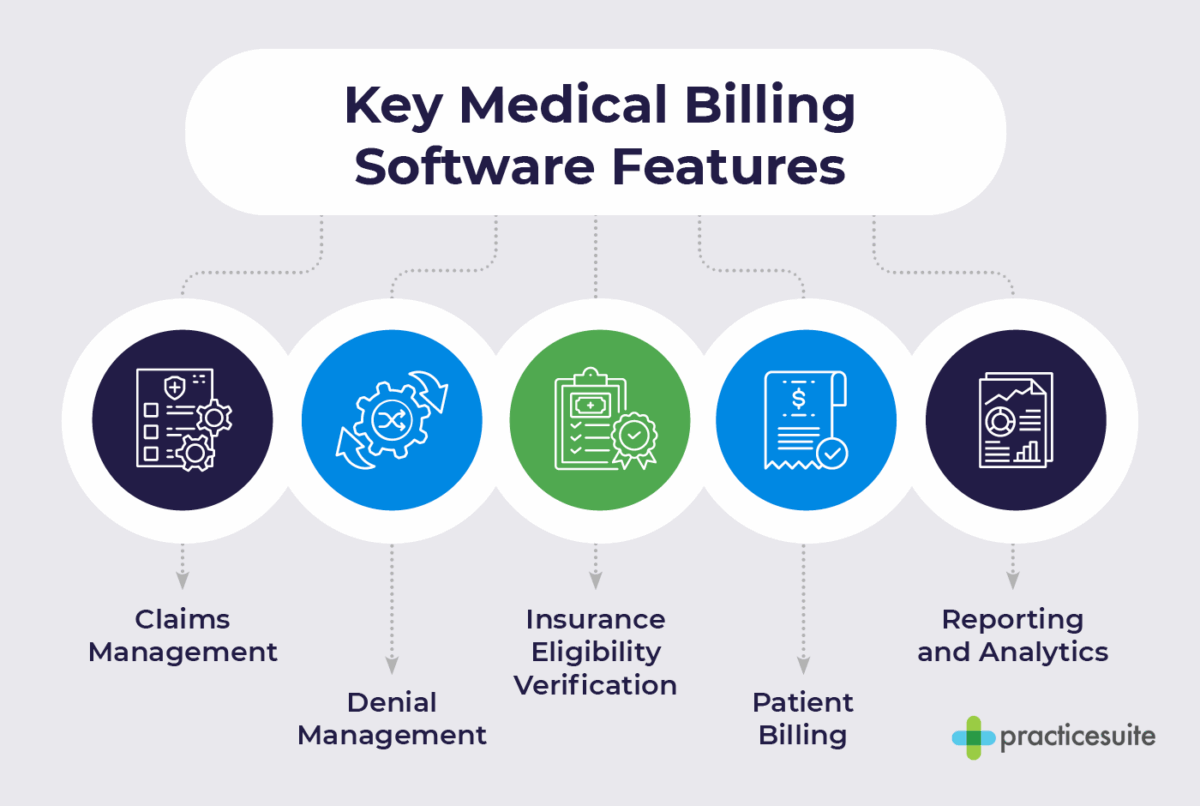
- Claims management: The bulk of payments made to medical practices are made by insurance providers, not your individual patients. Your medical billing solution should enable you to create and track all insurance claims, ensuring you can view the status of each claim in one dashboard and determine the next steps to take.
- Denial management: Insurance providers may reject your claims for various reasons. Denial management features track your rejected claims, summarize the reason for the denial, and outline the steps you should take to correct your error and resubmit your claim. This helps you recover revenue that you may have otherwise lost.
- Insurance eligibility verification: Before the patient’s appointment, your software will electronically confirm that the patient’s insurance is active and verify key details, such as their co-pay and deductible. This helps prevent claim denials, which most commonly occur due to billing a patient with inactive or incorrect insurance information.
- Patient billing: Patients may be obligated to pay for a portion of the care they received, which is why patient billing features are essential. Your medical billing software should allow you to generate clear billing statements, send automated payment reminders, and even enable patients to pay online.
- Reporting and analytics: Your small practice’s medical billing software should make it easy to understand your financial situation at a glance. Reporting and analytics features should turn your billing data into simple reports with key performance indicators (KPIs), accounts receivable (A/R) aging, and denial analysis.
Certain medical billing solutions may also offer additional practice management features, such as patient scheduling or a patient portal for sending communications. While these features aren’t strictly necessary for medical billing software, they are helpful for practices that lack existing tools to address these needs.

Key Decision Criteria for Medical Billing Software
Aside from ensuring that any potential medical billing tools include the aforementioned features, your small medical practice should also keep the following details in mind as you conduct your research:

- Practice size and specialty: As a small medical practice, you likely don’t need any enterprise-level features targeted toward much larger healthcare organizations. More features are not always a benefit, especially if you’re paying for capabilities that you won’t use. Ensure that you invest in a solution that suits your practice size and specialty, or one that allows you to pay only for the features you use.
- EHR integrations: Coding is essential to clear electronic health records (EHRs) and medical billing. Having a medical billing solution that integrates with your EHR platform reduces manual entry, minimizes claim denials, accelerates your cash flow, and frees up staff time, making it a critical consideration for your new solution.
- Compliance and security: Healthcare organizations and the tools they use must adhere to medical regulations about patient information and privacy, such as HIPAA. Make sure that any medical office solution you are considering is HIPAA-compliant and secure to keep patient data safe.
- Pricing: As a small to medium-sized medical practice, you likely have a smaller budget than larger organizations. Software may be more costly than you originally anticipated, as one-time implementation fees, ongoing monthly service fees, and fees for any add-ons you choose to purchase can add up. Consider all the various costs as you search for a solution that suits your budget.
- Customer support and training: A great software solution should provide customer support and training to help your medical practice’s team get up and running as soon as possible with their new tools. Look for providers that have dedicated 24/7 customer service teams to assist you whenever you encounter any issues.
Before you start your search, align with your leadership team regarding your highest-priority criteria and features. It’s also a good idea to connect with the people in your office who are currently handling medical billing, as they’ll have a front-line perspective of what your new solution needs. By interviewing all these individuals, you’ll know exactly what is expected of your medical billing software, so you can make informed decisions when creating your shortlist and deciding which provider to go with.
Medical Billing Software for Small Practices: FAQ
What is the Difference Between Medical Billing Software and an RCM Service?
Medical billing software is a tool or platform that allows your small medical practice to have full control of its billing process. Your team members will use the software to manage patient data and billing tasks, from claim submission to denial management and A/R follow-up.
RCM services, on the other hand, refer to billing tasks and workflows that you outsource to a third-party company. If you choose to work with a company offering RCM services, they’ll use their own software to handle your billing processes. This frees up your staff time, but usually comes at a higher cost, as RCM services typically charge a percentage of the funds they collect on your medical practice’s behalf.
How Much Does Medical Billing Software Cost?
The price of medical billing software varies significantly depending on the pricing model, vendor, and features included. Most vendors require medical practices to reach out for a custom quote, but they commonly charged fees include:
- Monthly subscription fees
- Implementation and setup fees
- Data migration fees
- Clearinghouse fees
- Integration fees
- Support fees
Do I Need an EHR with My Medical Billing Software?
While you can technically buy standalone billing software, it’s highly recommended that modern practices consider solutions that are part of all-in-one practice management platforms or tools that can integrate with their EHR systems. With integrated software, the patient’s information and correct billing codes are automatically sent to the billing software with one click. This reduces manual data entry and errors, resulting in increased revenue for your medical practice.
Additional Resources
Inefficient medical billing is one of the greatest obstacles small medical practices face when trying to grow their revenue and scale up. Luckily, investing in a robust medical billing software solution can help you overcome this obstacle, setting your practice up for future revenue growth and greater success.
If you’re interested in learning more about medical billing and medical software, check out the following resources:
- 10+ Top EHR Software Providers for Detailed Records. Also looking for an EHR provider to streamline patient records? Explore our list of top software solutions.
- Top 7 Revenue Cycle Management (RCM) Companies. Want to manage your entire revenue cycle, not just billing? These comprehensive solutions can help you practice profitably.
- 11 Top Medical Practice Management Software Tools. Billing isn’t the only workflow you can simplify with software. Explore these tools that can streamline all aspects of your practice.